
Continuum Removal#
Continuum removal divides a spectrum by its own smooth upper envelope. What is left has no overall brightness and no overall slope — only the absorption features, expressed as fractional depths below 1.0.
It is the standard preparation before identifying a material from its spectrum, and it is what makes two spectra comparable when they were measured under different illumination, at different scales, or by different instruments.
How it works#
The upper convex hull of the spectrum is computed — the taut line lying above every point, touching it at the shoulders of each absorption. WISER uses a monotone-chain hull algorithm.
The hull is linearly interpolated onto the spectrum’s wavelength grid.
The spectrum is divided by the interpolated hull.
The result is 1.0 wherever the spectrum touches its own continuum and dips toward 0 inside each absorption band. Where the hull evaluates to zero the result is set to 1.0 rather than dividing by zero.
What it buys you#
Illumination and brightness drop out. A shadowed and a sunlit pixel of the same material give nearly the same continuum-removed spectrum.
Band depth becomes measurable.
1 − valueat a band center is the fractional depth, comparable between spectra.Instrument and grain-size effects are reduced, though not eliminated: grain size changes band depth as well as continuum level.
What it costs you
A continuum-removed spectrum is not reflectance. Absolute level is gone by construction, so anything depending on it, such as albedo, radiative-transfer input or a brightness-based classifier, cannot be computed from the result. Keep the original alongside.
The hull is also sensitive to the endpoints of the wavelength range you feed it. Removing the continuum over 400–2500 nm and over 2100–2300 nm gives different band depths for the same feature, because the hull is anchored at different points. Report the range you used.
Using it#
On a spectrum#
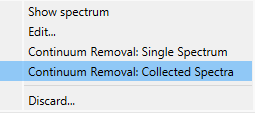
Right-click a spectrum’s name in the list below the Spectrum Plot and choose:
Continuum Removal: Single Spectrum — that spectrum
Continuum Removal: Collected Spectra — every collected spectrum
For each spectrum it processes, WISER adds two collected spectra,
<name> Continuum Removed and the hull, Convex Hull <name>, so you keep the
original.
On an image#
Right-click the image in the main view and choose Continuum Removal: Image.
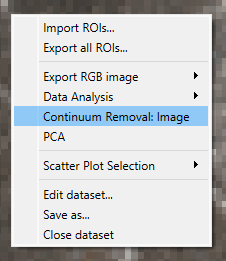
A dialog lets you restrict the run:
Dimensions — a row and column range, so you process only your study area
Bands — a band-number range, so the hull is fitted over the wavelength interval you care about rather than the whole spectrum
Both default to the full extent. Choose Default resets either tab.
The result is a new dataset with the same shape as the input.
Where it is used internally#
Spectral Feature Fitting continuum-removes both the pixel and the reference spectrum before fitting, then inverts the result so absorptions become positive peaks. If you are running SFF you do not need to continuum-remove first.